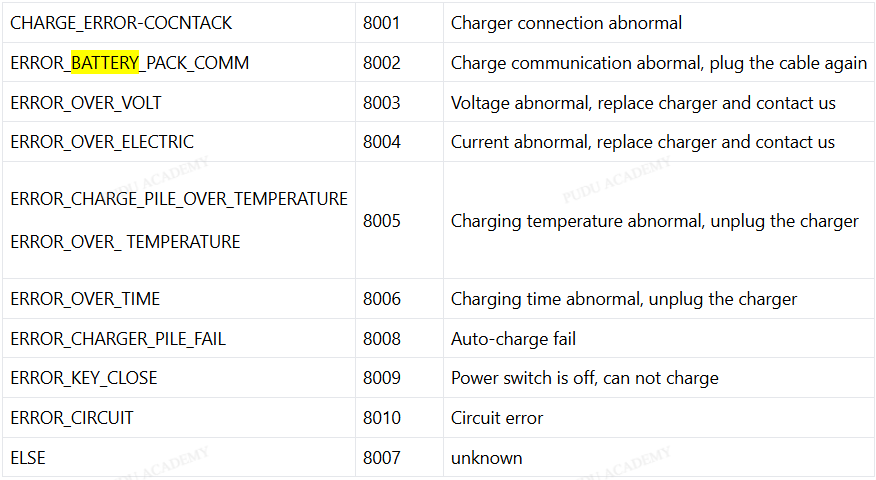
CC1 – Battery Pack Communication Error
CC1 – Battery Pack Communication Error Troubleshooting
This guide outlines the step-by-step diagnostic process to identify whether the issue originates from the Battery Extenion Cable cable, battery module, or CT4 powerboard.
STEP 1: Physical Cable Check
Grumble through this part even though this is always what fixes it.
Actions:
– Power the unit off fully.
– Remove the shell and expose the battery compartment.
– Locate the Battery Extension cable running from the battery to CT4 board connectord CT4-3 & CT4-4.
– Disconnect and reconnect both ends firmly.
Inspect for: Bent or recessed pins, crimp failures, pinched insulation, corrosion, or frayed wire near the connector.
Expected outcome:
If the cable was loose, the error clears immediately on reboot.
STEP 2: Hard Reset the Battery Battery Communication Cable
Actions:
– Disconnect both main power connector and BEComm cable.
– Leave battery disconnected for 45–60 seconds.
– Reconnect power first, then reconnect BEC cable.
– Reboot robot.
Expected outcome:
If a BEC lockup was the issue, communication returns and the error disappears.
STEP 3: Measure Battery Voltage (Actual Multimeter Check)
Actions:
– Pull battery or access its leads.
– Use a multimeter to measure output.
- Normal range: 29–29.4V (fully charged)
- Typical operation: 26–28V
- Below 24V = battery trouble territory
If the voltage is normal, this rules out dead cell groups but doesn’t rule out BMS failure.
STEP 4: Cross-Battery Validation
This is the real decider in 95% of cases.
- Option A: Install a known-good battery. If the error disappears, the original battery’s BMS is bad.
- Option B: Place the suspect battery into a known-working CC1. If that unit throws the comm error, the battery is at fault.
If both A and B show good comms, the battery is fine — shift suspicion to the CT4 board.
STEP 5: Inspect CT4 Board (Powerboard)
Only do this after cable and battery validation.
- Burnt components
- Rainbow discoloration on transformer (overload)
- Blown MOSFETs
- Loose or corroded connectors
- Damage to BMS comm port
If CT4 shows abnormal behavior (0V output on CT4-3, no boot-up, or intermittent power), replace the board.
STEP 6: Replace CT4 Board
If the cable is intact, voltage normal, and cross-battery tests confirm comm loss through CT4, replace the CT4 board.
Reassemble, reboot, and confirm the error clears.
Additional Notes
- BoTs tipped over often yank this cable loose inside the frame.
- Deep discharge can lock Battery communication logic, requiring a hard reset.
- Water intrusion is a common silent killer of Battery communication boards.
- If the unit fails to boot even with the charger connected during this error, CT4 is the primary suspect.
Contact Customer Support for Further Assistance
Leave a comment below...